
 By Maxmulsoft
2026-07-08 08:48:26
Comments
(0)
290
By Maxmulsoft
2026-07-08 08:48:26
Comments
(0)
290
How to Increase Website Speed and Improve Google Rankings
How to Increase Website Speed and Improve Google Rankings (Complete Guide)
In today's competitive digital world, website speed is one of the most important ranking factors for Google SEO. A slow-loading website not only frustrates visitors but also increases bounce rates, reduces conversions, and negatively impacts search engine rankings.
Google wants users to have the best possible experience. That's why websites that load quickly and perform smoothly are rewarded with better visibility in search results.
Whether you run a business website, eCommerce store, WordPress site, or portfolio, improving website speed should be your top priority.
In this complete guide, you'll learn proven techniques to make your website faster while improving your Google rankings.
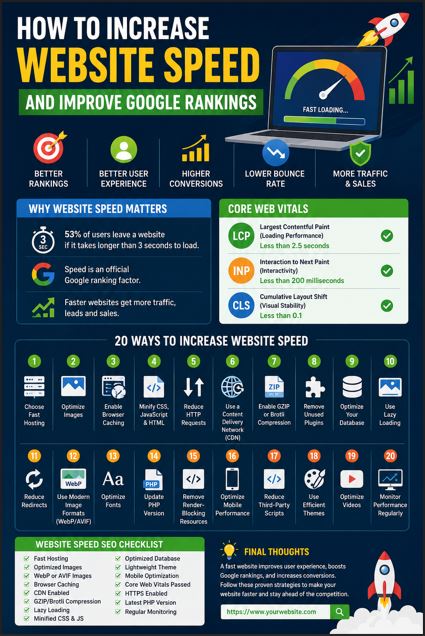
Why Website Speed Matters
Website speed directly affects:
- User Experience (UX)
- Search Engine Rankings
- Bounce Rate
- Conversion Rate
- Sales & Revenue
- Mobile Performance
- Customer Satisfaction
According to Google research:
- 53% of users leave a website if it takes longer than 3 seconds to load.
- Faster websites generate more leads and sales.
- Speed is an official Google ranking factor.
Benefits of a Fast Website
Better Google Rankings
Google favors websites that load quickly because they provide a better user experience.
Lower Bounce Rate
Visitors stay longer on websites that load instantly.
Higher Conversion Rate
Every second saved can increase sales and lead generation.
Better Mobile Experience
Most internet users browse on smartphones.
Improved User Experience
Fast websites create trust and professionalism.
Measure Your Website Speed First
Before making improvements, analyze your website using these tools:
- Google PageSpeed Insights
- GTmetrix
- Pingdom Website Speed Test
- Lighthouse
- WebPageTest
These tools help identify performance issues and optimization opportunities.
Understand Core Web Vitals
Google introduced Core Web Vitals to measure real user experience.
Largest Contentful Paint (LCP)
Measures loading speed.
Target:
Less than 2.5 seconds
Interaction to Next Paint (INP)
Measures responsiveness.
Target:
Less than 200 milliseconds
Cumulative Layout Shift (CLS)
Measures visual stability.
Target:
Less than 0.1
Improving these metrics significantly helps SEO.
1. Choose Fast Web Hosting
Your hosting provider plays a huge role in website speed.
Choose hosting with:
- SSD/NVMe Storage
- LiteSpeed Server
- HTTP/3 Support
- Latest PHP Version
- Server-side Caching
- High Uptime
- CDN Integration
Avoid cheap shared hosting if your website receives regular traffic.
2. Optimize Images
Large images are one of the biggest reasons websites load slowly.
Best practices:
- Compress images
- Resize images correctly
- Use modern formats:
- WebP
- AVIF
- Enable Lazy Loading
- Remove unnecessary metadata
3. Enable Browser Caching
Caching stores website resources on users' devices.
Benefits:
- Faster repeat visits
- Lower server load
- Improved PageSpeed score
4. Minify CSS, JavaScript & HTML
Remove:
- Extra spaces
- Comments
- Unused code
Minification reduces file size and speeds up loading.
5. Reduce HTTP Requests
Each image, CSS file, font, and JavaScript file creates a separate request.
Reduce requests by:
- Combining CSS files
- Combining JavaScript files
- Using SVG icons
- Eliminating unnecessary plugins
6. Use a Content Delivery Network (CDN)
A CDN stores website files on servers around the world.
Benefits:
- Faster loading globally
- Lower latency
- Better security
- Reduced server load
Popular CDNs include:
- Cloudflare
- BunnyCDN
- Amazon CloudFront
7. Enable GZIP or Brotli Compression
Compression reduces website file sizes before sending them to visitors.
Benefits:
- Faster downloads
- Lower bandwidth usage
- Better performance
Brotli generally performs better than GZIP.
8. Remove Unused Plugins
Too many plugins slow websites dramatically.
Regularly:
- Delete unused plugins
- Update active plugins
- Replace heavy plugins with lightweight alternatives
9. Optimize Your Database
Over time databases become bloated.
Regular maintenance includes:
- Removing spam comments
- Deleting revisions
- Cleaning temporary data
- Optimizing database tables
10. Use Lazy Loading
Lazy loading delays images and videos until users scroll to them.
Benefits:
- Faster initial page load
- Lower bandwidth consumption
- Better Core Web Vitals
11. Reduce Redirects
Too many redirects increase loading time.
Keep redirects minimal and remove outdated ones whenever possible.
12. Use Modern Image Formats
Instead of:
- JPG
- PNG
Use:
- WebP
- AVIF
These formats provide excellent quality with much smaller file sizes.
13. Optimize Fonts
Use:
- Local fonts when possible
- Font-display: swap
- Limited font weights
- Preload important fonts
Avoid loading multiple unnecessary font families.
14. Update PHP Version
Older PHP versions reduce performance.
Always use the latest stable PHP version supported by your website.
Benefits:
- Better security
- Faster execution
- Improved compatibility
15. Remove Render-Blocking Resources
Optimize:
- CSS loading
- JavaScript execution
Techniques include:
- Async loading
- Defer JavaScript
- Critical CSS
16. Optimize Mobile Performance
Google primarily uses Mobile-First Indexing.
Ensure your website:
- Loads quickly on mobile
- Uses responsive design
- Has readable text
- Features clickable buttons
- Avoids intrusive pop-ups
17. Reduce Third-Party Scripts
External scripts often slow websites.
Examples:
- Chat widgets
- Ads
- Analytics
- Social media embeds
- Tracking pixels
Only keep essential scripts.
18. Use Efficient Themes
If using WordPress:
Choose lightweight themes such as:
- GeneratePress
- Astra
- Kadence
- Blocksy
Avoid bloated multipurpose themes unless necessary.
19. Optimize Videos
Instead of uploading videos directly:
- Use YouTube
- Use Vimeo
- Enable lazy loading
- Display thumbnail previews
20. Monitor Performance Regularly
Website optimization isn't a one-time task.
Regularly monitor:
- PageSpeed Insights
- Core Web Vitals
- Search Console
- Analytics
- GTmetrix reports
Common Website Speed Mistakes
Avoid these common issues:
- Oversized images
- Cheap hosting
- Too many plugins
- Unoptimized CSS
- Large JavaScript files
- No caching
- No CDN
- Too many fonts
- Excessive redirects
- Heavy sliders
Auto-playing videos